Brochure dimensions matter because the right size affects folding, readability, printing accuracy, mailing, display, and brand presentation. A brochure that is too small can feel crowded, while an oversized brochure may cost more to print, fold, mail, and store.
The best brochure size depends on the format, fold style, paper size, design layout, and printer requirements. Common US brochure flat sizes include 8.5 × 11 inches, 8.5 × 14 inches, and 11 × 17 inches. Internationally, A4, A5, DL, and A3 brochure sizes are also used. This brochure size guide explains standard measurements, fold types, bleed setup, safe area, pixels, paper stock, and custom brochure dimensions.
Standard Brochure Size Explained
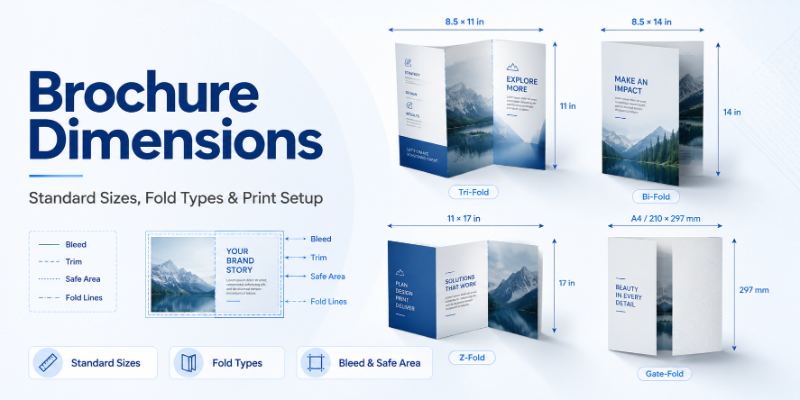
A standard brochure size is a commonly used sheet size that works well for brochure printing, folding, mailing, and distribution. In the United States, the most common flat sizes are 8.5 × 11 inches, 8.5 × 14 inches, and 11 × 17 inches.
An 8.5 × 11 inch sheet is widely used for tri-fold and bi-fold brochures. An 8.5 × 14 inch legal-size sheet gives more panel space for service menus and detailed handouts. An 11 × 17 inch tabloid sheet is often used for larger bi-fold brochures, product catalogs, real estate brochures, and premium marketing materials.
Internationally, A4, A5, and DL formats are common. A4 is close to US letter size, A5 is compact, and DL is popular for slim brochures, mailers, and folded marketing pieces. A brochure can also be A3 when a larger presentation format is needed.
Brochure Size Chart
| Brochure Type | Flat Size in Inches | Flat Size in MM | Folded Size | Best Use |
|---|---|---|---|---|
| Letter tri-fold brochure | 8.5 × 11 | 216 × 279 | About 3.67 × 8.5 in / 93 × 216 mm | Services, menus, handouts |
| Letter bi-fold brochure | 8.5 × 11 | 216 × 279 | 5.5 × 8.5 in / 140 × 216 mm | Company profiles, short guides |
| Legal tri-fold brochure | 8.5 × 14 | 216 × 356 | About 4.67 × 8.5 in / 119 × 216 mm | Detailed service brochures |
| Tabloid bi-fold brochure | 11 × 17 | 279 × 432 | 8.5 × 11 in / 216 × 279 mm | Catalogs, premium brochures |
| A4 tri-fold brochure | 8.27 × 11.69 | 210 × 297 | 3.9 × 8.27 in / 99 × 210 mm | International marketing |
| A4 bi-fold brochure | 8.27 × 11.69 | 210 × 297 | 5.85 × 8.27 in / 148.5 × 210 mm | Reports, business brochures |
| A5 brochure | 5.83 × 8.27 | 148 × 210 | Varies by fold | Compact product handouts |
| DL brochure | 3.9 × 8.27 | 99 × 210 | Usually finished size | Direct mail, menus |
| A3 brochure | 11.7 × 16.5 | 297 × 420 | Varies by fold | Large menus, catalogs, presentations |
| Custom brochure | Varies | Varies | Varies | Branded print materials |
Brochure Dimensions in Inches
In the United States, inches are the most common measurement unit for brochure printing, marketing materials, and packaging-related print projects. Designers usually set brochure files in inches for flat size, folded size, bleed, trim size, and safe area.
Designers working with US printers usually set files in inches for flat size, folded size, bleed, trim size, and safe area.
For example, a standard letter tri-fold brochure starts as an 8.5 × 11 inch sheet and folds into three vertical panels. A letter bi-fold starts with the same flat size but folds once into 5.5 × 8.5 inches. A tabloid bi-fold starts as 11 × 17 inches and folds into a larger 8.5 × 11 inch brochure.
Brochure Dimensions in MM and CM
Brochure dimensions in mm are useful for international printing and precise print-ready artwork. Millimeters help designers align fold lines, panel spacing, trim size, and bleed area accurately.
For reference, US letter size is about 216 × 279 mm or 21.6 × 27.9 cm. Legal size is 216 × 356 mm or 21.6 × 35.6 cm. Tabloid size is 279 × 432 mm or 27.9 × 43.2 cm. A4 is 210 × 297 mm or 21 × 29.7 cm, A5 is 148 × 210 mm or 14.8 × 21 cm, and DL is commonly 99 × 210 mm or 9.9 × 21 cm.
Always confirm final measurements with your printer before production because folding equipment, trim tolerance, and panel setup can vary.
Brochure Size in Pixels
Brochure size in pixels depends on final print size and resolution. For professional brochure printing, artwork is usually prepared at 300 DPI so images, logos, and text print clearly.
A standard US letter brochure at 8.5 × 11 inches equals about 2550 × 3300 pixels at 300 DPI. For a landscape tri-fold brochure, the file is commonly set as 3300 × 2550 pixels. An A4 brochure at 300 DPI is about 2480 × 3508 pixels.
Pixel size matters when designing brochures in Canva, Photoshop, Illustrator, or similar tools. A design may look sharp on screen but print poorly if the resolution is too low.
Tri-Fold Brochure Size
The most common tri-fold brochure size in the US starts with an 8.5 × 11 inch flat sheet. After folding, it creates six panels: three on the front and three on the back. The finished size is usually about 3.67 × 8.5 inches or 93 × 216 mm.
Tri-fold brochure panels are not always exactly equal. One panel often folds inside, so it may need to be slightly narrower to prevent buckling. This is why fold lines and panel widths should match the printer’s template before the design is finalized.
A standard US letter tri-fold brochure is often 3300 × 2550 pixels at 300 DPI when designed in landscape format. Tri-fold brochures work well for menus, service brochures, product guides, real estate brochures, healthcare handouts, and retail promotions.
Bi-Fold Brochure Size
A bi-fold brochure has one fold and four total panels: front cover, inside spread, and back cover. A common US bi-fold starts as 8.5 × 11 inches and folds to 5.5 × 8.5 inches.
Bi-fold brochures are useful when you need a cleaner layout, larger visuals, and less panel complexity. They are common for corporate profiles, product catalogs, presentation handouts, short guides, sales sheets, and premium marketing pieces.
Standard Brochure Measurements by Fold Type
A half-fold brochure folds once down the center and works well for company profiles, product introductions, and business brochures.
A tri-fold brochure folds into three panels and is one of the most common options for menus, service lists, healthcare brochures, and handouts.
A Z-fold brochure opens like an accordion, making it useful for timelines, maps, menus, and step-by-step information.
A gate-fold brochure opens from both sides toward the center and works well for luxury campaigns and product launches.
An accordion-fold brochure uses multiple zigzag panels and is helpful for event schedules, travel guides, and visual storytelling.
A roll-fold brochure folds inward panel by panel, so inner panels must be sized carefully.
A 4-fold brochure can be made from 8.5 × 14 inches, 11 × 17 inches, A4, A3, or a custom flat size. Common 4-fold styles include accordion fold, roll fold, double parallel fold, and gate-style fold.
Flat Size vs Folded Size
Flat size and folded size are different but equally important. A brochure may begin as an 8.5 × 11 inch sheet, but after folding, it becomes smaller and easier to hold, mail, or display.
Flat size affects printing cost, artwork setup, and paper stock selection. Folded size affects mailing, handouts, rack displays, brochure holders, and customer experience. Always provide both measurements when ordering brochures.
Bleed, Trim Line, Fold Line, and Safe Area
| Print Term | Meaning | Why It Matters | Design Tip |
|---|---|---|---|
| Bleed | Extra artwork beyond the trim edge | Helps prevent white borders after cutting | Extend backgrounds into bleed |
| Trim line | Final cut edge | Defines finished size | Keep key content away from it |
| Fold line | Where the brochure folds | Controls panel layout | Avoid placing text directly on folds |
| Safe area | Inner content zone | Protects text and logos | Keep content inside safe margins |
| Margin | Space around content | Improves readability | Use consistent spacing |
| Final size | Finished printed size | Affects display and mailing | Confirm before printing |
Important text, logos, QR codes, contact details, and images should not sit too close to trim or fold lines. Most printers recommend adding bleed and keeping key content inside the safe area.
Brochure Dimensions PDF and Print Templates
A brochure dimensions PDF is usually a print-ready template that shows trim size, bleed area, fold lines, safe area, and panel layout. Templates are especially useful for tri-fold, roll-fold, accordion-fold, gate-fold, and 4-fold brochures.
Before creating artwork, ask your printer for the correct PDF, AI, PSD, or InDesign template. This reduces guesswork and helps keep text, images, logos, and QR codes away from trim and fold lines.
What Size Is a Canva Brochure?
A common Canva brochure size is 11 × 8.5 inches for a US letter landscape brochure, often used for tri-fold designs. Canva also supports A4 and other brochure formats depending on the selected template.
When using Canva for brochure printing, check the document size before designing. Turn on bleed if available, use high-resolution images, and download the final file as a print PDF.
How to Choose the Right Brochure Size
Start with the purpose of the brochure. A restaurant menu needs a different layout than a real estate listing, healthcare guide, or trade show handout. Decide how much content you need before choosing the fold style.
A compact tri-fold works well for brochure racks and direct mail. A larger bi-fold gives more room for photos and premium presentation. Choose paper stock based on durability, handling, and brand image. Before designing, confirm final print specifications with your printer.
Best Brochure Size by Business Use
Product brochures usually work best in letter tri-fold or tabloid bi-fold formats because they provide enough space for features, benefits, and images. For restaurants, tri-fold, legal tri-fold, or A3 folded brochures are often better because food lists, pricing, and offers need to be displayed clearly.
Similarly, real estate brochures perform well in bi-fold or tabloid formats because they allow room for property photos, maps, features, and agent details. For healthcare businesses, compact tri-folds are usually more effective because they keep patient information organized and easy to read. Meanwhile, event brochures can use Z-fold or accordion-fold layouts for schedules, maps, and sponsor details. On the other hand, trade show brochures work best as easy-to-carry tri-folds or larger bi-folds when a more premium presentation is needed.
Paper Stock and Finish Options for Brochures
Paper choice affects how a brochure feels, folds, and prints. Text paper is lightweight for high-volume brochures, while cover stock and cardstock feel stronger and more premium. Recycled paper supports eco-conscious branding.
Finish options include matte, gloss, soft-touch coating, UV coating, Spot UV, foil stamping, embossing, and debossing. Choose the finish based on budget, handling, durability, and brand image.
Printing Tips for Better Brochure Results
Use high-resolution images and design in CMYK color mode for accurate brochure printing. Add proper bleed, keep text inside the safe area, and leave enough space around fold lines. Use readable font sizes and avoid overcrowding panels.
Balance images and text so each panel has a clear purpose. Check the final proof carefully before printing. A proof helps catch spelling errors, panel order problems, image issues, and fold alignment mistakes before production.
Common Mistakes to Avoid
Avoid choosing the wrong brochure size for the amount of content. Do not ignore fold lines or forget bleed. Keep text away from edges and avoid low-resolution images.
Other common mistakes include adding too much content, using poor panel sequence, weak contrast, small font sizes, and not checking printer requirements. Never approve production without reviewing a proof.
Custom Brochure Dimensions
Custom brochure dimensions are useful when standard sizes do not support the brand or campaign goal. Luxury brands, product launches, event campaigns, premium catalogs, retail inserts, packaging inserts, direct mail campaigns, and unique brand presentations may benefit from custom sizing.
Custom sizes can help a brochure stand out, but they should still be practical for printing, folding, mailing, and handling. A custom brochure should improve the message, not make the piece difficult to use.
Final Verdict
Brochure dimensions affect design, folding, printing, mailing, display, and user experience. Standard brochure sizes are a smart starting point, but the best size depends on content, fold style, printing needs, and brand goals.
Before finalizing artwork, check the flat size, folded size, bleed area, safe area, fold lines, pixels, paper stock, and printer requirements. A well-planned brochure looks professional, reads clearly, and supports your brand wherever it is handed out or displayed.
Custom Brochures by Custom Boxes Lab
Custom Boxes Lab helps businesses create custom brochures with accurate dimensions, professional printing, premium paper stocks, branded layouts, and custom brochure dimensions for marketing, retail, events, and business promotions.
Our brochure options can include matte and gloss finishes, soft-touch coating, foil stamping, Spot UV, embossing, debossing, CMYK printing, and print-ready artwork support. Whether you need business brochures, product brochures, menu brochures, promotional materials, or branded print materials, Custom Boxes Lab can help you create brochures that look polished and print correctly.
Need custom brochures with accurate sizing and professional print setup? Custom Boxes Lab can help you create brochures based on your exact fold style, paper stock, finish, and branding needs.